Kirim pesan Interktif Button Reply
POST/nusasms_api/1.0/wa_business/interactive/button_reply
Syarat Penggunaan
Untuk mengirim tipe pesan ini (seperti tipe reply / balasan), harus sudah ada Conversation room (percakapan) antara akun Whatsapp (Gateway) dengan si penerima pesan.
Introduction
Pesan interaktif tombol balasan (reply button) dapat membantu anda mengirim pesan dengan tombol balasan (max 3 tombol) untuk dipilih si penerima pesan.
Komponen Request Json
-
header: Tipe yang tersedia:text,document,image, danvideo
opsional
Contoh:text:{"type": "text", "text": "Your Text Header"}document:{"type": "document", "link": "YOUR_DOC_URL", "filename": "document.pdf"}image:{"type": "image", "link": "IMAGE_URL"}video:{"type": "video", "link": "VIDEO_URL"}
Ekstensi berkas media
document:pdf,doc,docs,ppt,pptx,txt,xlsdanxlsximage:jpegdanpngvideo:3gpdabmp4
-
body: Teks badan pesan
wajib, max 1024 karakter -
footer: Teks/catatan kaki
opsional, max 60 karakter -
buttons: Tombol balasan
max 3 tombolbutton_id: id pengenal dari tiap tombol. Wajib unik.
max 256 karaktertitle: Teks/label dari tombol.
max 20 karakter
Contoh
{
  "gateway_id": "YOUR_GATEWAY_ID",
  "recipient": "RECIPIENT_NUMBER",
  "header": {
    "type": "image",
    "link": "https://api-doc.nusasms.com/slate/img/logo.png"
  },
  "body": {
    "text": "This is the main text.\nMake it sounds cool\n😁"
  },
  "footer": {
    "text": "A little note on the footer"
  },
  "buttons": [
    {
      "button_id": "BTN ID 1",
      "title": "This is"
    },
    {
      "button_id": "BTN ID 2",
      "title": "some"
    },
    {
      "button_id": "BTN ID 3",
      "title": "cool buttons"
    }
  ]
}
Pratinjau
Pratinjau tampilan pesan.
Pesan Diterima
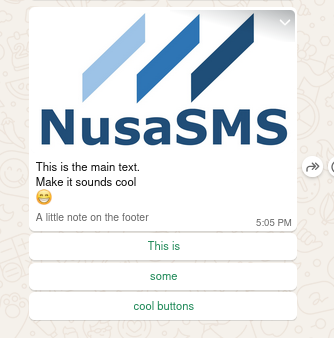
Balasan dengan Tombol
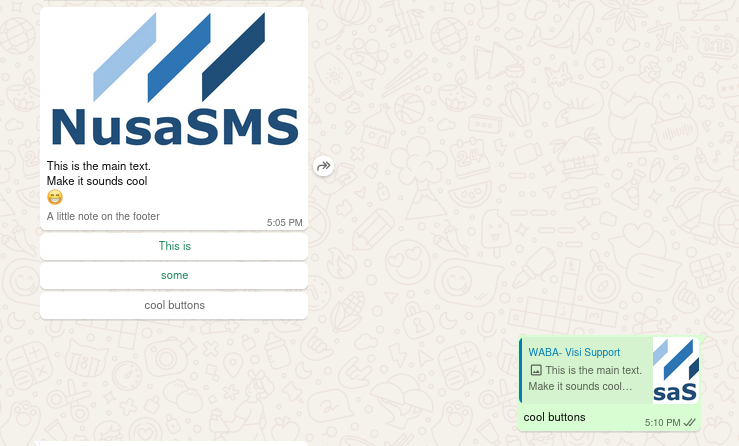
Request
Responses
- 200
- 400
- 403
- 422
Successful Response
Request validation error
Forbidden access
Validation Error