WabaReply
To send Reply message, you must first establish a Conversation room with the recipient. In other word, your recipient must sent a message to your gateway.
Introduction
Reply message allow you to send free text (without template), document, image and video message.
Text
Text is the most basic type for this endpoint.
{
    "recipient": "<RECIPIENT>",
    "gateway_id": "<YOUR_GATEWAY_ID>",
    "type": "text",
    "payloads": {
        "body": "this is the text message"
    }
}
Document
| Type | Extension | Max Size | MIME Type |
|---|---|---|---|
| Text | .txt | 100 MB | text/plain |
| Microsoft Excel | .xls | 100 MB | application/vnd.ms-excel |
| Microsoft Excel | .xlsx | 100 MB | application/vnd.openxmlformats-officedocument.spreadsheetml.sheet |
| Microsoft Word | .doc | 100 MB | application/msword |
| Microsoft Word | .docx | 100 MB | application/vnd.openxmlformats-officedocument.wordprocessingml.document |
| Microsoft PowerPoint | .ppt | 100 MB | application/vnd.ms-powerpoint |
| Microsoft PowerPoint | .pptx | 100 MB | application/vnd.openxmlformats-officedocument.presentationml.presentation |
.pdf | 100 MB | application/pdf |
{
    "recipient": "<RECIPIENT>",
    "gateway_id": "<YOUR_GATEWAY_ID>",
    "type": "document",
    "payloads": {
        "link": "<YOUR DOCUMENT URL>",
        "caption": "<YOUR CAPTIONS; optional>"
        "filename": "<THE FILENAME; optional>"
    }
}
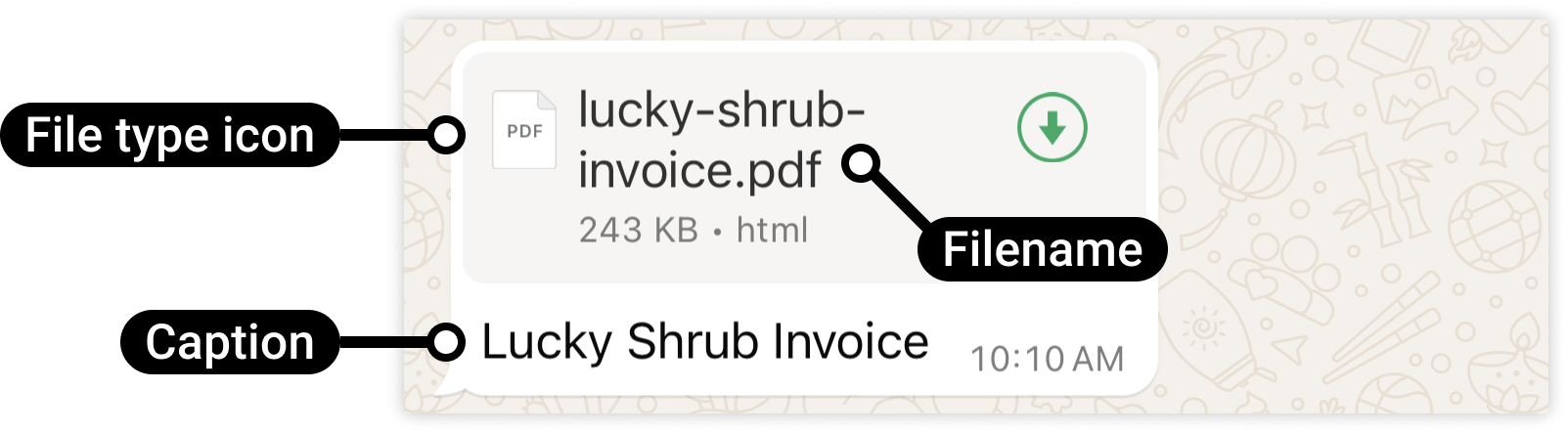
Document Message Preview
Here is the preview when you got this type of message.
Image
| Type | Extensions | MIME Type | Max Size |
|---|---|---|---|
| JPEG | .jpeg, jpg | image/jpeg | 5 MB |
| PNG | .png | image/png | 5 MB |
{
    "recipient": "<RECIPIENT>",
    "gateway_id": "<YOUR_GATEWAY_ID>",
    "type": "image",
    "payloads": {
        "link": "<YOUR IMAGE URL>",
        "caption": "<YOUR IMAGE CAPTIONS; optional>"
    }
}
Video
| Type | Extensions | MIME Type | Max Size |
|---|---|---|---|
| 3GPP | .3gp | vide/3gpp | 16 MB |
| MP4 Video | .mp4 | video/mp4 | 5 MB |
{
    "recipient": "RECIPIENT",
    "gateway_id": "YOUR_GATEWAY_ID",
    "type": "video",
    "payloads": {
        "link": "<YOUR VIDEO URL; required>",
        "caption": "<YOUR CAPTIONS; optional>"
    }
}
Reaction
Send reaction to message 🎉.
{
    "recipient": "RECIPIENT",
    "gateway_id": "YOUR_GATEWAY_ID",
    "type": "reaction",
    "payloads": {
        "message_id": "<MESSAGE_ID; required>",
        "emoji": "<EMOJI; required>"
    }
}
Contextual Reply
Contextual reply message can not be used on reaction message and for replying reaction message.
Contextual replies are a special way of responding to a WhatsApp user message. Sending a message as a contextual reply makes it clearer to the user which message you are replying to by quoting the previous message in a contextual bubble:
Preview:
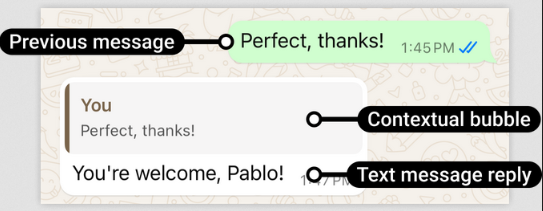
Use message_id_context that contains message_id value from Inbox or previous message.
You can get message_id of your inbox message by subscribing Whatsapp Business Webhook feature.
Example:
The json content below is written short for better readibility
{
  "gateway_id": "GATEWAY_ID",
  "recipient": "NOMOR_PENERIMA",
  "type": "text",
  "payloads": {
    "text": "Teks pesan"
  },
  "message_id_context": "wamid.RandomIdText"
}