WabaInteractiveMediaCarousel
Syarat Penggunaan
Supaya dapat mengirim tipe pesan ini (seperti tipe reply / balasan), harus sudah ada Conversation room (percakapan) antara akun Whatsapp (Gateway) dengan si penerima pesan.
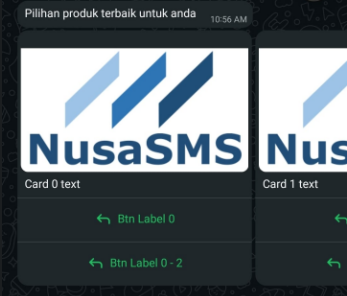
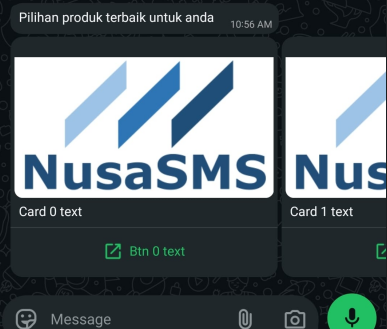
Interactive media carousel messages display a set of horizontally scrollable media cards. Each card can display an image or video header, body text, and either quick-reply buttons or a URL button.
Introduction
Json Request Components
body: The main body text
required, max 1024 characterscards: The media cards, with the component details below.
required, min 2, max 10 items
Card Components
card_index: Card order starts from 0 (first/most left card) optionalheader: The card header image/video
requiredtype:imageandvideoonlylink: the media file URL
body: The card text
optionalbuttons: Card button. There are 2 types of buttonsurlandquick_reply
Note: Button types and numbers must match across all cards (for example, if you define a card with 2 quick-reply buttons, all cards must define exactly 2 quick-reply buttons).
url: max 1 buttonquick_replymax 2 buttons
optional
Card Button
There are 2 types of card buttons, namely url and quick_reply. Make sure to have same type and button number for every card.
cards parameter value examples:
- URL Button
- Quick Reply Button
  "cards": [
    {
      "Card_index": 0,
      "header": {
        "type": "image",
        "link": "https://api-doc.nusasms.com/slate/img/logo.png"
      },
      "body": {"text": "Card 0 text"},
      "buttons": [
        {
          "text": "Btn 0 text",
          "url": "https://doc.nusasms.com/docs/nusasms/nusasms-api/"
        }
      ]
    },
    {
      "Card_index": 1,
      "header": {
        "type": "image",
        "link": "https://api-doc.nusasms.com/slate/img/logo.png"
      },
      "body": {"text": "Card 1 text"},
      "buttons": [
        {
          "text": "Btn 1 text",
          "url": "https://doc.nusasms.com/docs/nusasms/nusasms-api/"
        }
      ]
    }
  ]
Message Preview
  "cards": [
    {
      "Card_index": 0,
      "header": {
        "link": "https://api-doc.nusasms.com/slate/img/logo.png",
        "type": "image"
      },
      "body": {"text": "Card 0 text"},
      "buttons": [
        {"button_id": "btn0", "text": "Btn Label 0"},
        {"button_id": "btn0_2", "text": "Btn Label 0 - 2"}
      ]
    },
    {
      "Card_index": 1,
      "header": {
        "link": "https://api-doc.nusasms.com/slate/img/logo.png",
        "type": "image"
      },
      "body": {"text": "Card 1 text"},
      "buttons": [
        {"button_id": "btn1", "text": "Btn Label 1"},
        {"button_id": "btn1_2", "text": "Btn Label 1 - 2"}
      ]
    },
    {
      "Card_index": 2,
      "header": {
        "link": "https://api-doc.nusasms.com/slate/img/logo.png",
        "type": "image"
      },
      "body": {"text": "Card 2 text"},
      "buttons": [
        {"button_id": "btn2", "text": "Btn Label 2"},
        {"button_id": "btn2_2", "text": "Btn Label 2 - 2"}
      ]
    }
  ]
Message Preview